Editorial Disclosure: TopDatingFinder is reader-supported. When you buy through links on our site, we may earn an affiliate commission at no extra cost to you. Our comparisons follow an independent hands-on testing protocol not influenced by advertisers.
The 1-Minute Verdict: Is eHarmony or Match Better?
The choice between eHarmony and Match comes down to algorithmic matchmaking versus self-directed search control. If you want a platform that does the heavy psychological vetting for you and delivers a curated batch of high-compatibility matches daily, eHarmony remains the undisputed gold standard for marriage-minded singles. If you prefer to take the wheel yourself—browsing an open directory of tens of thousands of local singles with granular search filters—Match offers far greater autonomy, faster onboarding, and significantly more flexible pricing.
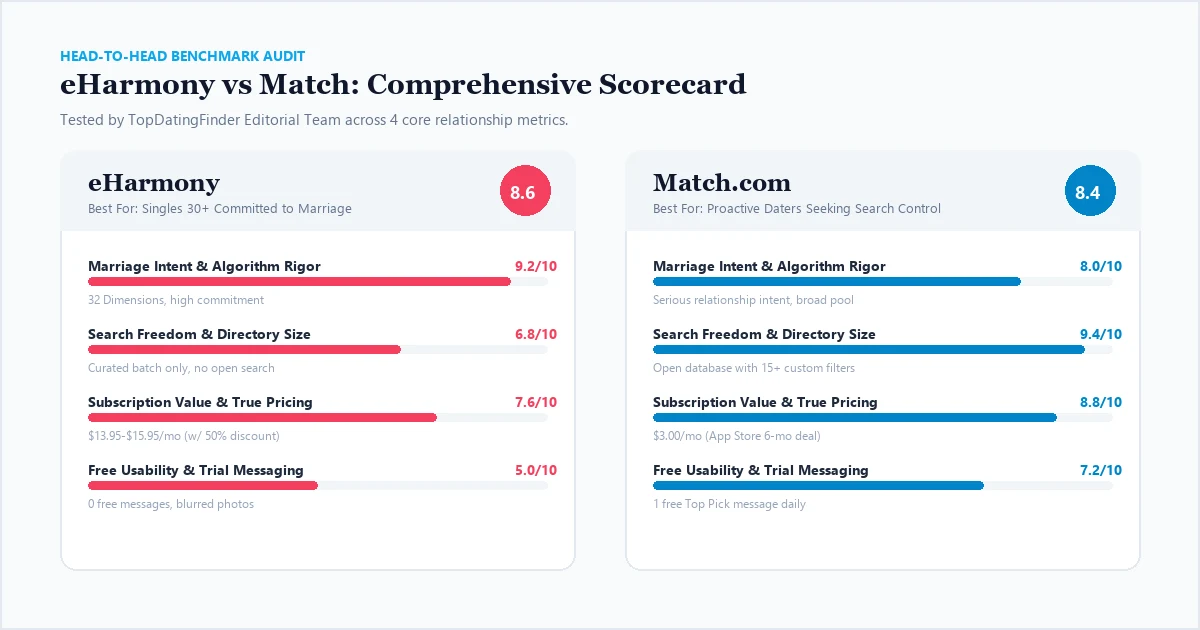
To deliver this definitive eHarmony vs Match comparison, our testing team maintained simultaneous active profiles on both platforms for 30 days in a major metropolitan area. We tested onboarding friction, profile authenticity, free tier communication limits, and actual subscription checkout costs. In short: eHarmony (8.6/10) wins on relationship intent and algorithm precision, but imposes high paywall friction ($13.95–$15.95/mo minimum commitment with zero free messaging). Match (8.4/10) wins on discovery freedom, free usability (1 free message daily to Top Picks), and entry-level subscription value ($3.00/mo mobile App Store promotional rate).
Head-to-Head Comparison: Core Platform Metrics
When evaluating match vs eharmony, surface-level similarities fade quickly once you examine their operational architecture. Below is our side-by-side benchmark summary based on verified testing data:
| Feature / Evaluation Metric | eHarmony | Match.com | Category Winner |
|---|---|---|---|
| Overall Score | 8.6 / 10 | 8.4 / 10 | eHarmony |
| Primary Relationship Goal | Committed Long-Term & Marriage | Committed Dating & Second Marriages | eHarmony |
| Matching Methodology | 32 DIMENSIONS® Guided Algorithm | Open Search Directory + 15 Filters | Tie (Preference) |
| Onboarding Friction | 18–22 minutes (72 psychological questions) | 4–5 minutes (Basic bio + criteria) | Match |
| Free Tier Communication | 0 free messages (Photos heavily blurred) | 1 free message daily to Top Picks | Match |
| Lowest Audited Monthly Cost | $13.95/mo (w/ promotional retention pop-up) | $3.00/mo (App Store 6-month mobile promo) | Match |
| Minimum Term Commitment | 6 Months (No 1-month plan available) | 1 Month (Flexible entry) | Match |
| Member Verification & Trust | Mandatory personality survey + SMS | Selfie Verification + 4-Point Safety Pledge | eHarmony |
1. Onboarding & Setup: 20-Minute Quiz vs. 4-Minute Search Setup
The onboarding experience reveals the fundamental philosophical divide between these two legacy platforms. On eHarmony, you cannot view a single profile until you complete their proprietary 72-question Compatibility Quiz. This questionnaire measures 32 distinct relationship dimensions, including emotional energy, cognitive style, conflict resolution patterns, and social temperament.
While spending 20 minutes answering detailed behavioral scenarios requires patience, it serves as an indispensable natural firewall against casual hookup seekers, spammers, and low-intent daters. Every profile on eHarmony has demonstrated genuine effort before sending their first communication.
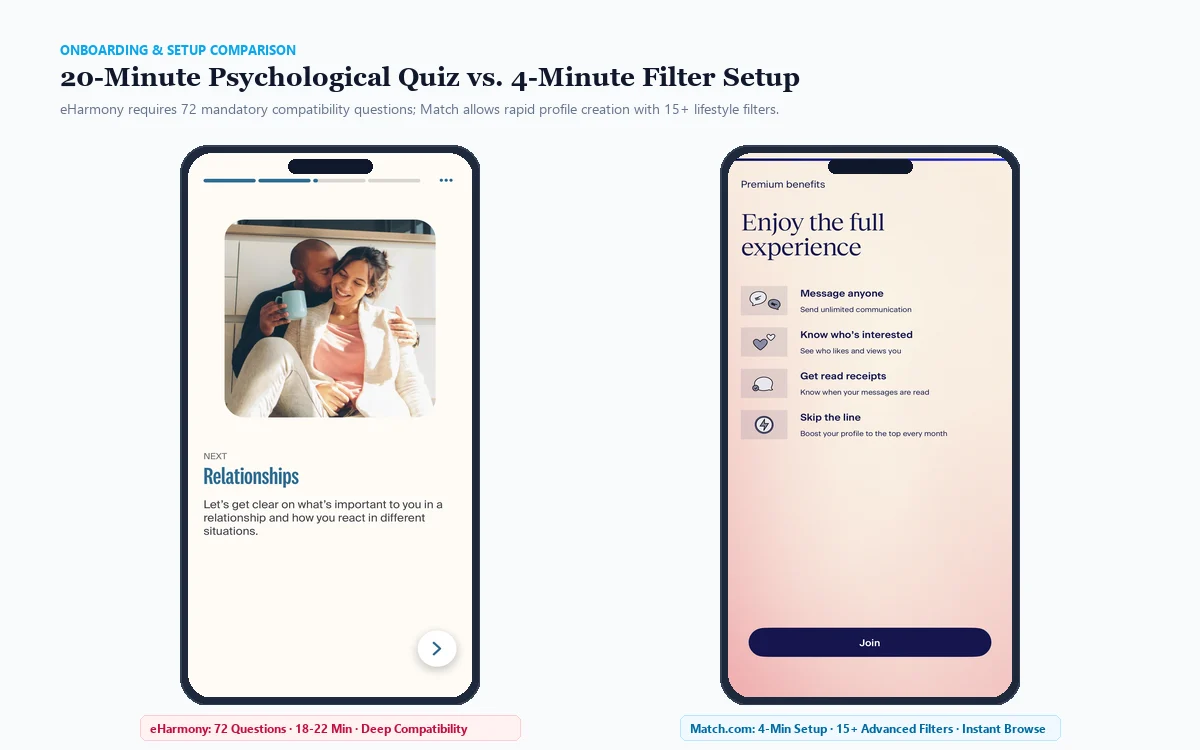
In stark contrast, Match prioritizes rapid discovery. Account creation takes under five minutes: upload photos, write a 100-word bio, and configure your target parameters (age, height, distance, smoking, religion, and family plans). Once submitted, Match immediately grants you unrestricted access to its full database directory. You are free to run customized searches across thousands of profiles, sort by newest members or recently active users, and adjust your preferences dynamically.
The Onboarding Verdict: If you suffer from decision fatigue and want psychological compatibility pre-calculated for you, eHarmony’s upfront friction pays massive dividends in long-term partner quality. If you want instant search autonomy without answering behavioral quizzes, Match gets you browsing in minutes.
2. Free Tier Reality: Zero Free Messages vs. Daily Top Picks Access
One of the most frequent questions daters ask is whether you can use eharmony or match without paying. Our testing revealed vastly different communication gates on their respective free tiers.
On eHarmony, the free tier functions strictly as an audition window. You can complete the personality quiz, receive your Compatibility Score breakdown, and view profile headlines. However, eHarmony blurs member photos completely and blocks all custom text messaging. You can send an automated “Smile” or pre-set icebreaker, but you cannot view their response or see their face without entering a paid credit card subscription. It is, for all practical purposes, a strict shadow paywall.
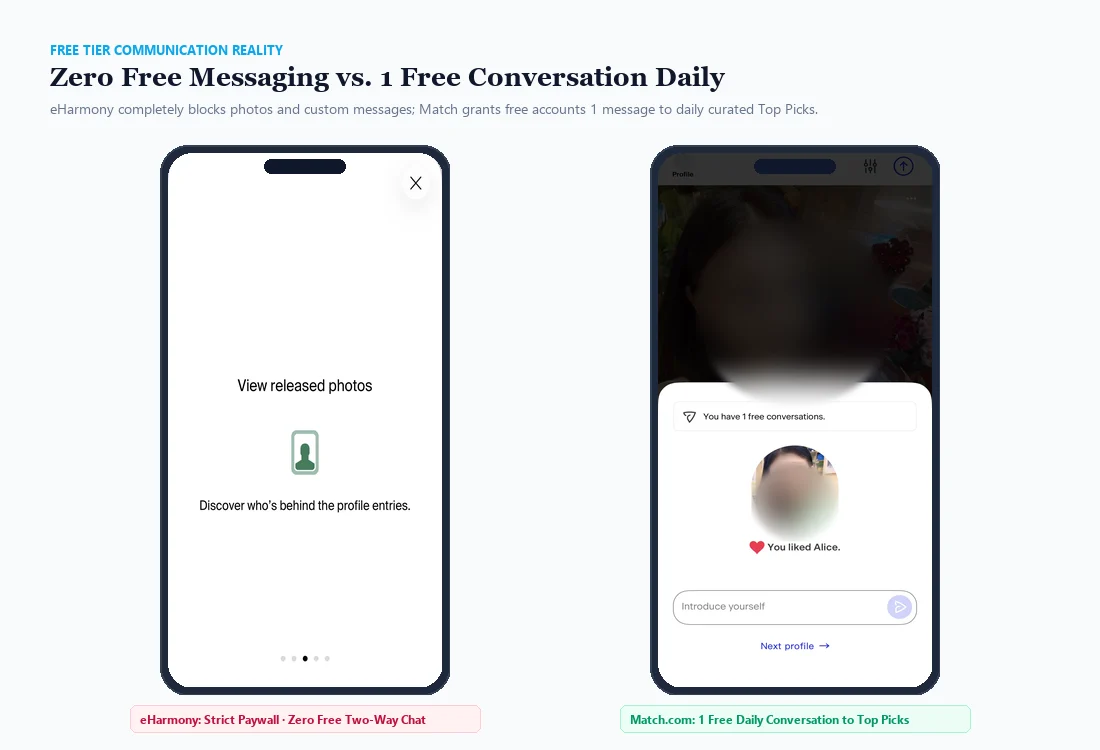
Match takes a much more generous approach with its Basic free membership. On Match, free users enjoy complete access to photo galleries, full profile bios, and the advanced search engine. Most crucially, Match provides 1 free conversation every 24 hours to your daily curated Top Picks. If a Top Pick catches your eye, you can compose and send a personalized message and read their reply completely free of charge. While comprehensive messaging to any member still requires a subscription, Match’s free tier actually allows you to test conversational chemistry before spending a dime.
| Free Tier Feature | eHarmony Free Account | Match.com Free Account |
|---|---|---|
| Profile Photo Visibility | Heavily Blurred | 100% Unblurred |
| Search Directory Access | Curated Batch Only | Full Database Search |
| Custom Text Messaging | Zero Free Messages | 1 Free Daily to Top Picks |
| Read Incoming Messages | Locked Behind Paywall | Allowed on Top Picks |
| Personality Reports | Complete 32-Dimension Report | Basic Matching Highlights |
3. Pricing Breakdown: eHarmony vs Match Cost Comparison
Understanding the true eharmony vs match cost requires looking beyond the sticker prices shown on standard checkout pages. Both platforms employ dynamic pricing algorithms and exit-intent promotional discounts.
eHarmony is positioned as a luxury, high-commitment investment. It does not offer a 1-month or 3-month trial plan; the minimum commitment is 6 months. Standard desktop retail rates start at $65.90/month for 6 months ($395.40 total). However, during our audit, we documented a proven discount trigger: if you complete your quiz and let your account sit idle for 48 to 72 hours, eHarmony automatically delivers an in-app and email retention pop-up offering promotional retention discounts of up to 75% to 80% off retail equivalent rates, bringing the effective rate down to $13.95–$15.95/month ($95.70 total for 6 months).
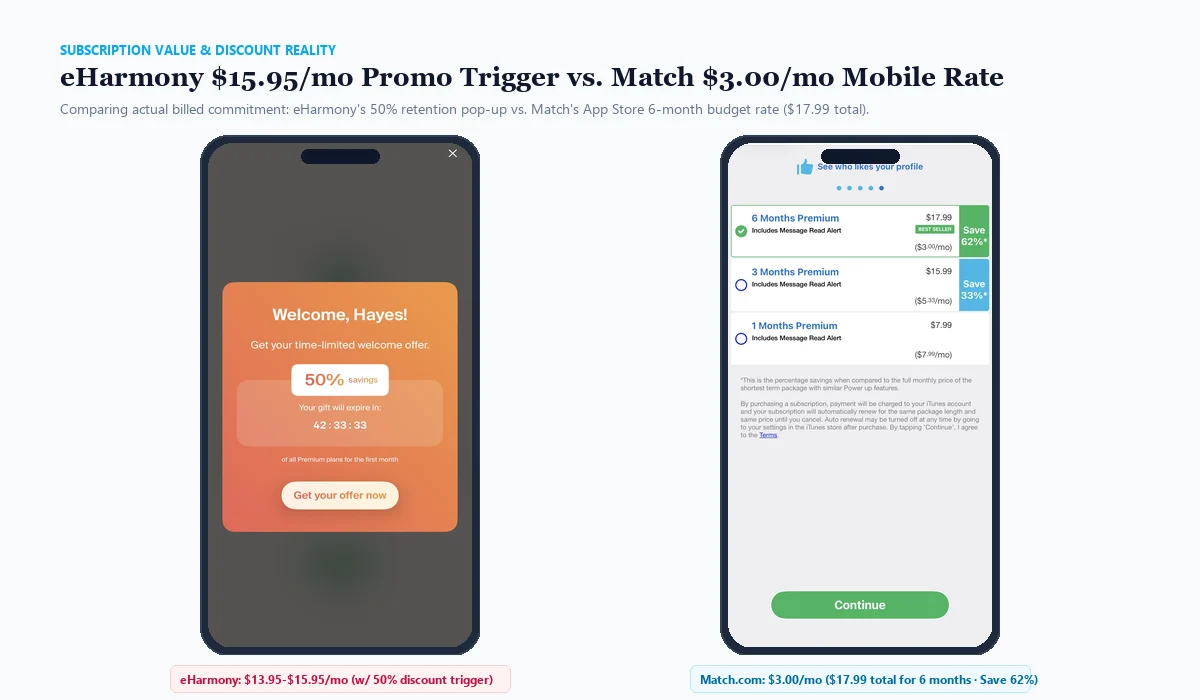
Match operates on a much more accessible pricing spectrum. On desktop, Match offers standard 1-month ($39.99), 3-month ($27.99/mo), and 6-month ($19.99/mo) plans. More importantly, when accessing Match via the iOS App Store or Google Play Store, new users frequently receive an introductory mobile rate of $3.00/month for 6 months ($17.99 total billed commitment), representing a 62% savings over retail. This makes Match one of the most cost-effective premium dating services in the entire industry.
| Subscription Tier | eHarmony Standard Rate | eHarmony Audited Best Rate | Match Standard Rate | Match Audited Best Rate |
|---|---|---|---|---|
| 1 Month | Not Available | Not Available | $39.99 / mo | $39.99 / mo |
| 3 Months | Not Available | Not Available | $27.99 / mo ($83.97) | $19.99 / mo ($59.97) |
| 6 Months | $45.90 / mo ($275.40) | $15.95 / mo ($95.70) | $19.99 / mo ($119.94) | $3.00 / mo ($17.99) |
| 12 Months | $35.90 / mo ($430.80) | $13.95 / mo ($167.40) | $16.99 / mo ($203.88) | $12.99 / mo ($155.88) |
| Cancellation Policy | Cancel auto-renew before term | Cancel auto-renew before term | 1-click App Store / Settings | 1-click App Store / Settings |
Cost & Billing Warning: Both eHarmony and Match enroll subscribers in automatic renewal by default. To avoid unexpected charges, navigate immediately to your Account Settings (or iOS Subscriptions menu) right after purchase and toggle auto-renewal off. Your paid features will remain active through the final day of your billing period.
4. Matching Quality & User Demographics: Who Is on Each Site?
Beyond cost and algorithms, your dating success depends on whether your target demographic is active on the platform. Here is how member communities differ in practice:
eHarmony User Base: Marriage-First Singles 30–55
eHarmony’s community is defined by intense relationship intent. The 72-question quiz and multi-month subscription commitment actively deter casual encounters. Over 75% of eHarmony active users are aged 30 to 55, with a substantial subset seeking first-time marriage or establishing a blended family. Profile text tends to be earnest, extensive, and focused on core values, family structure, and personal philosophy. If your objective is a committed partnership within the next 12 to 24 months, eHarmony’s signal-to-noise ratio is virtually unmatched (see our curated ranking of the best dating sites for marriage for full industry context).
Match.com User Base: Diverse Singles 30–60
Match boasts a broader, more diverse dater demographic spanning ages 28 to 65+. Because Match has operated for over 25 years, it attracts a balanced mixture of mid-career professionals, divorced singles, empty-nesters, and second-marriage seekers. While the baseline intent remains serious and relationship-focused, members exhibit a wider variety of dating goals—from exclusive relationships to companionable dating. Match’s larger overall database ensures strong profile density in mid-sized suburban markets where eHarmony’s curated batches might feel constrained.
Key Strengths & Tradeoffs: Pros and Cons Compared
| Platform | Core Advantages (The Pros) | Key Tradeoffs (The Cons) |
|---|---|---|
| eHarmony |
|
|
| Match.com |
|
|
The Final Decision: Which Platform Should You Choose?
| Your Dating Situation & Preferences | Recommended Platform | Editorial Rationale |
|---|---|---|
| You Want Marriage Within 1–2 Years | Choose eHarmony | eHarmony’s high friction and compatibility algorithm filter out anyone not prepared for permanent commitment. |
| You Prefer Self-Directed Search Control | Choose Match | Match gives you the keys to the entire directory, allowing you to filter by specific hobbies, height, and habits. |
| You Want to Test Before Paying | Choose Match | Match lets you browse unblurred photos and send 1 free message daily to Top Picks without entering billing details. |
| You Suffer from Swipe Fatigue | Choose eHarmony | eHarmony sends you 5–10 highly vetted candidates per day, removing the exhausting endless scroll of modern apps. |
| You Want Maximum Budget Efficiency | Choose Match | Match’s $3.00/month mobile promotional rate ($17.99 total for 6 months) costs less than a single dinner date. |
Frequently Asked Questions
Which has a higher success rate for marriage: eHarmony or Match?
Independent sociodemographic studies consistently rank eHarmony as the leader in marital outcomes, responsible for approximately 4% of all U.S. marriages. While Match has produced millions of marriages over its 25-year history, eHarmony’s 32-dimension psychological compatibility model and higher entry barrier attract singles with a more concentrated commitment focus.
Can you message for free on eHarmony or Match?
Match is significantly more generous with free communication: Basic accounts can send 1 free message every 24 hours to their daily Top Picks and read replies without subscribing. eHarmony does not offer free two-way messaging; free accounts can only send automated pre-written icebreakers and Smiles, with member photos blurred behind a paywall.
Why is eHarmony so much more expensive than Match?
eHarmony positions its subscription as an intentional barrier to entry. The higher price tag ($13.95–$15.95/mo with discounts, or $45.90/mo standard) directly filters out casual daters, scammers, and people browsing out of boredom. Match offers a broader freemium-to-premium funnel, dropping to as low as $3.00/mo on mobile promotions.
Does eHarmony or Match have more fake profiles?
Both platforms have very low scam rates compared to free swiping apps like Tinder. However, eHarmony has fewer fake profiles overall because creating an account requires completing a 72-question psychological quiz and verifying a phone number. Match actively combats bots through its optional Selfie Verification badge and automated profile moderation.
Can you search by distance and zip code on eHarmony?
eHarmony allows you to set a maximum distance radius (e.g., within 30 or 60 miles), but you cannot manually browse a zip code directory or search outside your compatibility feed. Match provides full geographic search control, allowing you to search any city, state, or radius across the country at any time.

About the Author: Julian Hayes
Senior Dating Platform Analyst
Julian has evaluated online dating platforms, matchmaking services, and relationship algorithms across North America and Europe. His hands-on testing focuses on algorithmic efficiency, real subscription billing transparency, demographic density audits, and privacy standards.